OPTIONS
This is the section where you manage and customize your Comixware program. Options provides user manageability to three areas of the program: Asset Management, Upgrade Management, and License Management.
Asset Management
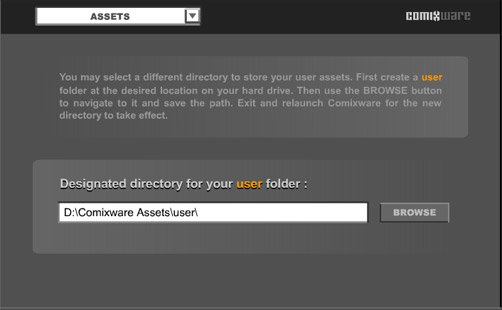
By default Comixware's user assets are stored in the subfolders of 'C:\Comixware Assets\user\' directory. See The Physical Store of User Assets. you may change this "user" directory to a different location on your hard drive. Here is how:
| 1. |
First move the "user" folder (with all its sub-directories intact) to a desired new location on your hard drive.
|
| 2. |
Launch Comixware and go to Options > Assets panel. Type the path to the new "user" directory in the "Designation" field or use the BROWSE button to navigate to it and save the path.
|
| 3. |
Exit and relaunch the program for the new directory to take effect. Now your assets will be retrieved from the new location.
|
NOTE:
The name and the structure of this "user" directory (with all its sub-directory names intact) CANNOT be altered in any way. See the tree view of "user" directory.
 Introduction | Compose
| Play
| Save | Show |
Gallery | Options
Introduction | Compose
| Play
| Save | Show |
Gallery | Options 

